Save time every day
Create lesson phases in a few clicks and organise them into a clear structure instantly.
TeachVenture gives your lesson prep a clear structure – so you finish on time and show up fully for your students.
Free · no account required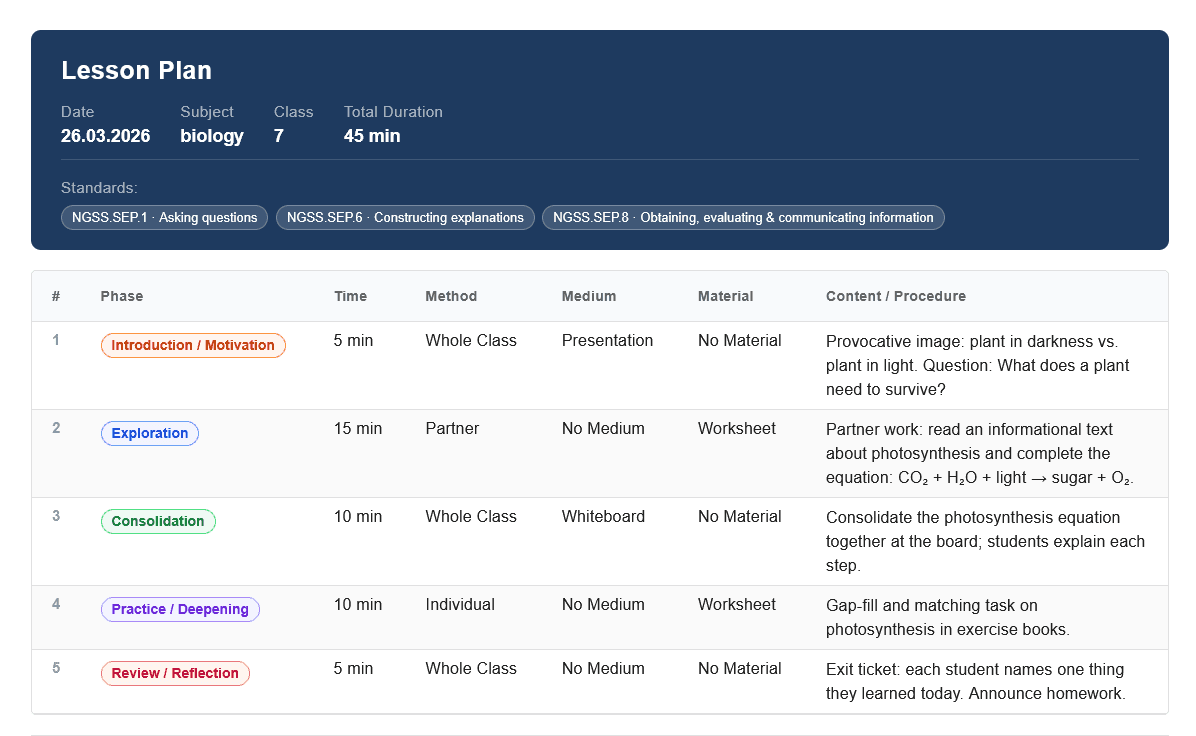
From spontaneous cover lessons to carefully planned units: you always keep the thread.
Create lesson phases in a few clicks and organise them into a clear structure instantly.
Document learning objectives, methods, media, and materials logically for each part of the lesson.
Export the finished plan as a PDF and share it with colleagues, trainees, or school management.
01
Enter date, subject, class, and duration.
02
Add procedure, method, materials, and content for each section.
03
Document, save, and share with one click.
Ready for more relaxed lesson prep?
Create your next lesson plan in minutes and focus more of your energy on your students.
Everything you need to know about TeachVenture and lesson planning.
Yes, TeachVenture is completely free. No registration, no account, and no subscription is required – just open the page and start planning immediately.
The tool is suitable for any school type. You can plan lessons for primary school, lower secondary, or upper secondary and adjust the content accordingly.
No. All data stays exclusively on your device in the browser's local storage. Nothing is transmitted to a server – your lesson plans are private.
The current plan is automatically saved as a draft in the browser and restored on your next visit. You will not lose any input.
Yes. Use the "Save Plan" button to store the current plan in your library. Click the folder icon in the toolbar to open all saved plans – you can load or delete any of them.
Clicking "Load Template" automatically fills all lesson phases with didactically sensible default values for the selected subject (introduction, main activity, consolidation, etc.). You can then edit everything freely.
The time indicator compares the total of planned phase minutes against the set lesson duration. Green means the timing is exact. Amber means a small deviation (up to 5 minutes). Red means more than 5 minutes off. A tooltip shows the exact amount over or under.
The differentiation toggle on each phase card reveals three separate text fields: Basic, Standard, and Extension. This lets you document differentiated tasks for different performance levels directly within a single plan.
The Task Generator creates tasks tailored to subject, grade, topic, and difficulty. Choose between individual tasks (open questions, multiple choice, fill-in-the-blank, true/false, calculation tasks) and a full worksheet with an answer key – both exportable as PDF. Supported subjects: Mathematics, German, English, Biology, History, Physics, and Computer Science.
Click "Download PDF" to generate a print-ready A4 landscape plan containing all phases, media, materials, learning objectives, and standards in a clear table. You can then share the file directly via email, cloud storage, or messaging apps.
Tips & Tricks for Everyday School Life
Short, battle-tested impulses on burnout prevention, parent meetings, classroom management and more.